Production-Ready Voice Agents: Many Specialists, One Conversation

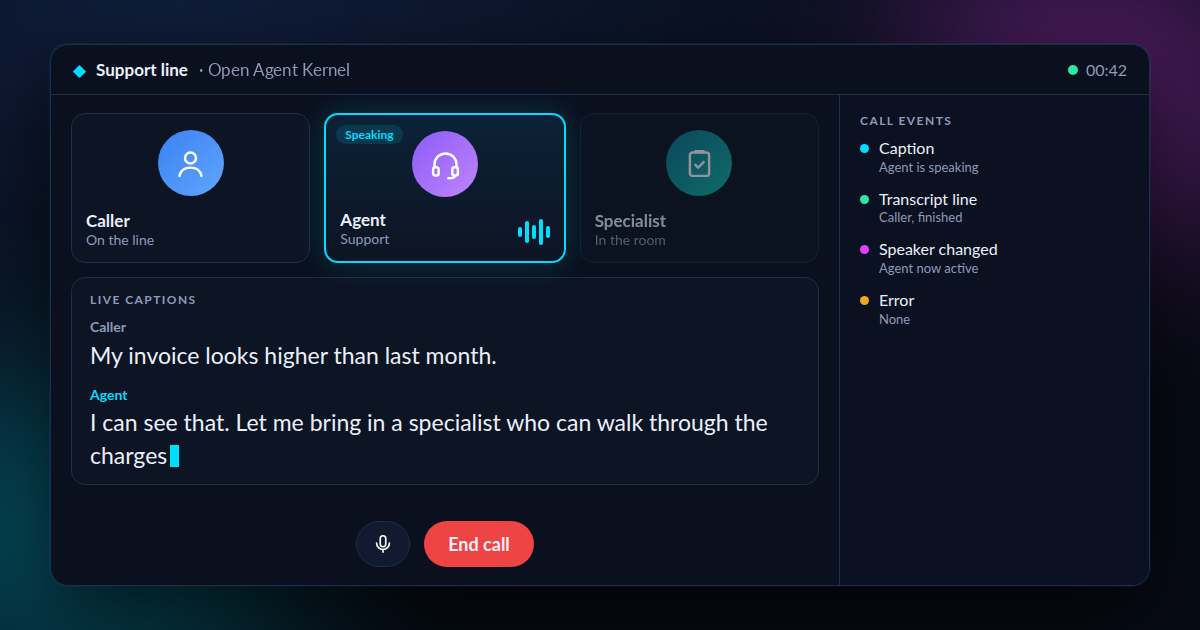
Some jobs are too big for one expert. A cancelled flight needs someone to find the booking, someone to rebook it, and someone to arrange a meal, a hotel and compensation. On most phone lines that means being transferred, and explaining everything again each time.
Voice agents can now work as a team. One agent answers and brings in the right specialist. The specialist picks up the same conversation, with no hang-up and no repeating yourself. Each one is an AI agent with its own role, its own tools and its own voice. The same pattern can fit any job that needs several specialists on one call, such as rebooking a flight, filing an insurance claim, onboarding a customer or resolving an IT ticket.
Three things make voice agents production-ready:
- Many specialists: a team of agents, each with a clear job.
- One conversation: handoffs move the call from one specialist to the next without starting over.
- Guardrails and records: your own rules run on the call, and every call is saved and traced.
Making that feel natural takes more than a model that can speak. Audio has to keep moving, the right agent has to take the floor, and you have to be able to interrupt, just as you would with a person. Open Agent Kernel (OAK), an open-source platform for running AI agents, connects those pieces to live voice sessions from the OpenAI Agents SDK and Google ADK, two popular tools for building agents. This post shows how it works, in plain terms first and in code second.
See It on a Real Call
Here is one example, a flight disruption desk built on this path. A traveller whose flight was cancelled talks to a concierge, a rebooking specialist and a care specialist by voice. The case board starts empty and fills in as the agents work: the booking once the concierge finds it, then the new flight, the meal voucher and the compensation claim. Watch the handoffs between the three agents, each one taking the call under its own name and voice. (This is a recording of a live call. The three agents are live Gemini voices. The caller is a scripted, synthetic voice, and its pauses after each agent finishes were shortened; the agents' response times are untouched.)
A Voice Call Is an Active Stream
A text chat is like email: the agent waits for a message, then sends back an answer. A voice call is like a phone call. Both sides can talk at once, and nobody waits for a turn to be sent. Microphone audio arrives in small chunks, the model streams audio and text back, and the caller may speak before the response is finished.
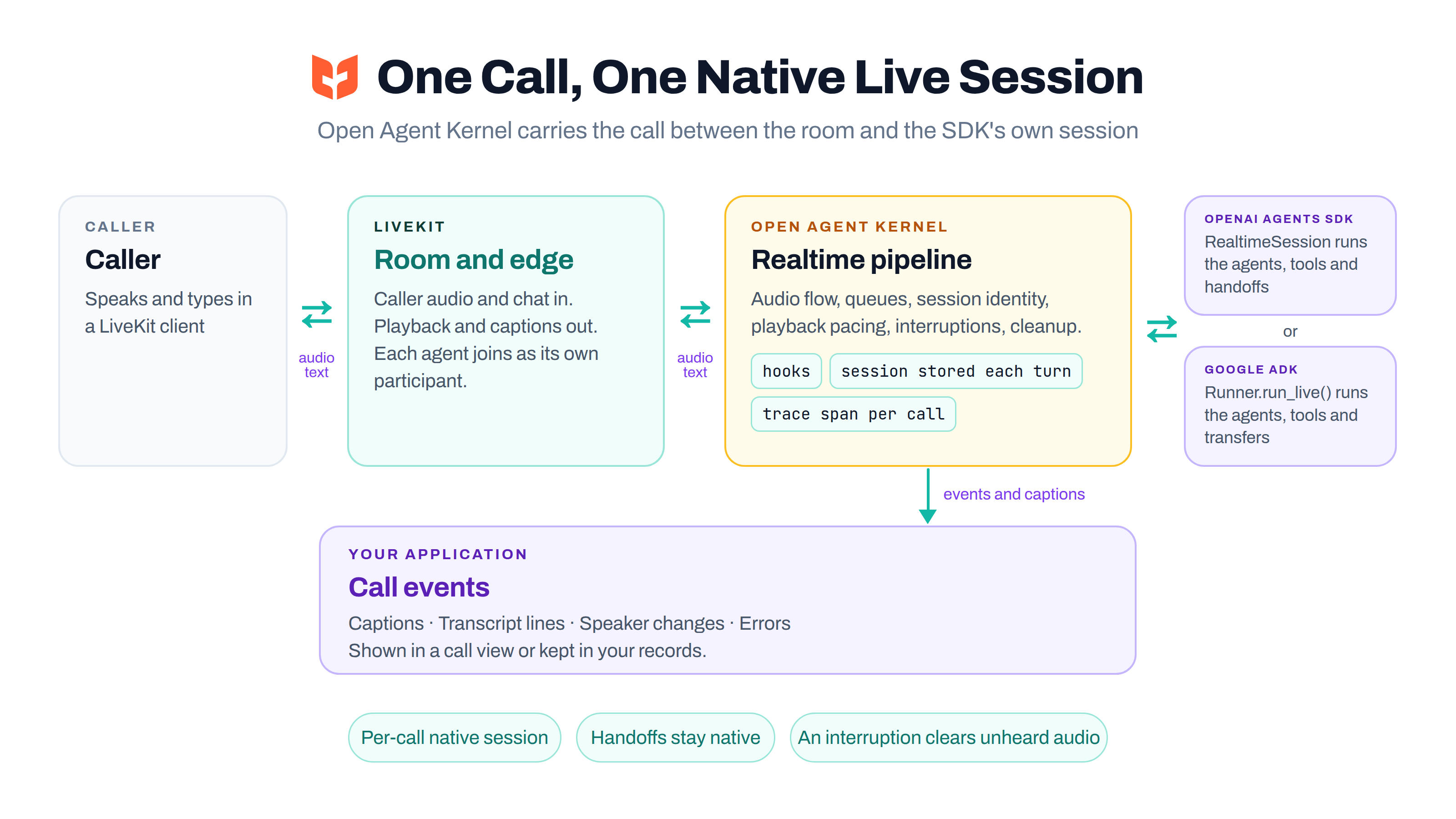
The LiveKit edge brings caller audio and room chat into OAK's realtime pipeline. The pipeline keeps a native live session for the OAK session, delivers input, and paces streamed output back to the room. If the caller talks over the agent, the response is interrupted and audio the caller has not heard is cleared from playback.
Teams and Handoffs: Let the Framework Choose the Next Speaker
OAK uses each framework's own live agent and handoff behavior. The OpenAI Agents SDK and Google ADK each run their own live session. Their native agents decide when to call a tool or transfer the conversation to another agent.
For example, a general support agent can hand a billing question to a billing specialist. OAK maps the handoff to LiveKit participants, and the room can mark which agent is active. Only the active voice agent speaks to the caller. The agents do not talk over each other, and an agent's own audio is not fed back as caller audio.
The key boundary is simple: the native SDK owns turns, tools, and handoffs; OAK owns the connection between that session and the live room. That keeps framework behavior intact while giving the application one place to manage the room, audio flow, session identity, playback, and cleanup.
Keep Your Application in the Conversation
The call can produce more than audio. LiveKit clients can show agent captions as the words are spoken. Caller transcript lines are available when the SDK's input transcription is on. Where it starts on depends on the SDK: Google ADK enables it by default, and with the OpenAI Agents SDK you set it in the session settings.
To follow the call from your own application, subclass LiveKitEdgeAdapter and override deliver_chunk. It receives each streamed chunk: audio, text, finished caller transcript lines, changes of speaking agent, and errors. Those events can update a call view or feed your own records. Keep slow work off this path, because the same path delivers the call's audio.
A call is a LiveKit room. LiveKit tells your app when a room opens (through a signed webhook), and OAK starts one edge for that room, with the room name as the session id. When the last caller leaves, the edge ends the session and closes its live session. A failed connection backs off before retrying, rather than reopening on every incoming audio chunk.
from agentkernel.integration.adapter import EdgeLifecycleRESTRequestHandler
from agentkernel.integration.livekit import LiveKitLifecycleAdapter
from agentkernel.pipeline import IOHandler

if __name__ == "__main__":
    IOHandler.run(handlers=[EdgeLifecycleRESTRequestHandler(LiveKitLifecycleAdapter())])
Override should_start(session_id) on the lifecycle adapter to choose which rooms get an edge, and opening_prompt on the edge to change how a call opens.
Guardrails: Put Your Own Rules on the Call
A live call is not a black box. OAK runs the same hooks you use in other modes, in the process that serves the call, so you can put your own rules on what is said and heard. It provides the hook points; what a rule does is your code.
- Typed text goes through
PreHook.on_run. A hook can rewrite it, or stop it before the model sees it. - Caller audio goes through the optional
PreHook.on_stream_input, one chunk at a time. A hook can pass a chunk on, change it, or drop it. - Model output goes through
PostHook.on_stream_event. A hook sees each audio, text and transcript event, and aMessageEndcloses every turn.
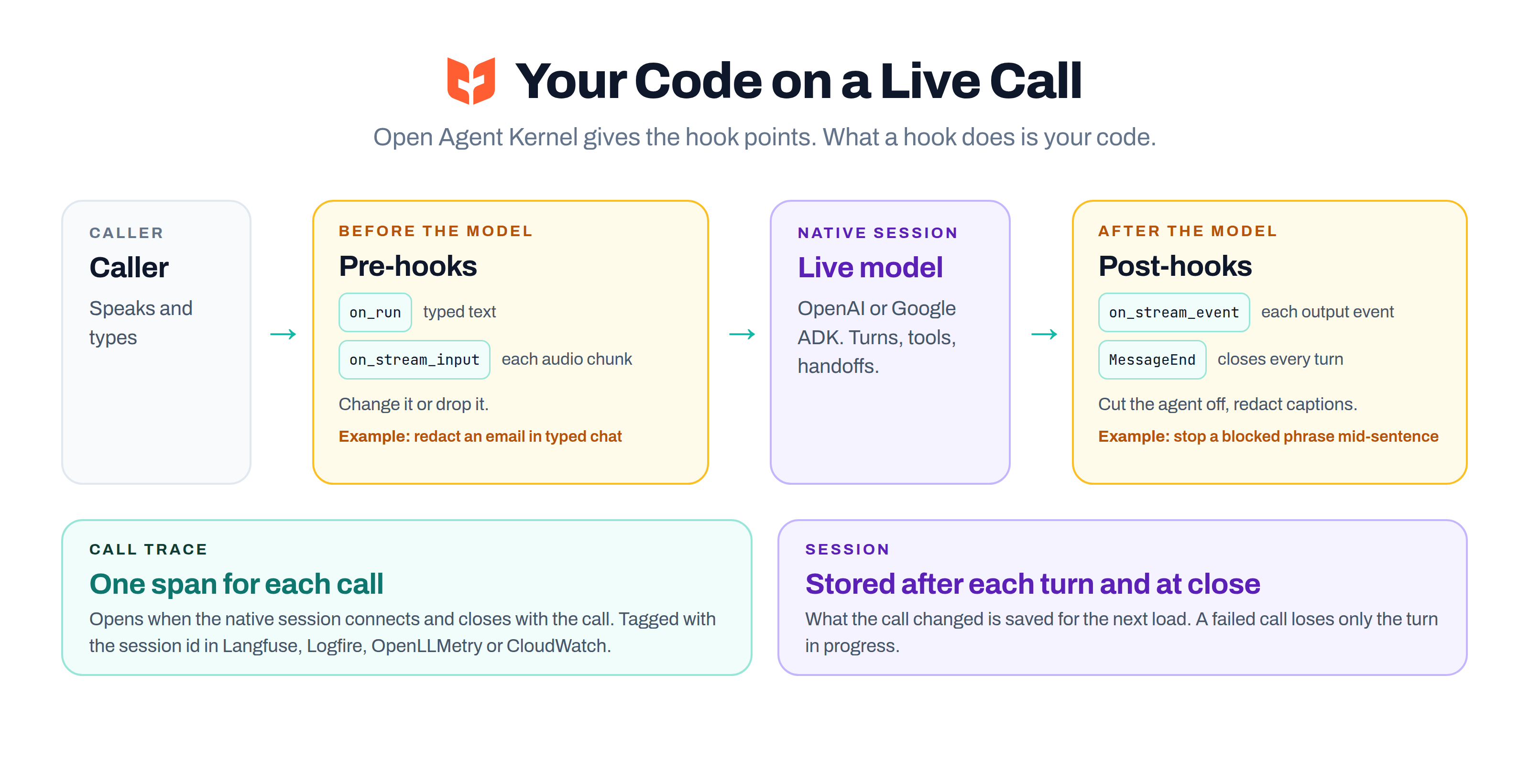
The voice guardrails example shows two hooks in practice. One redacts emails, card numbers and phone numbers in typed chat. The other watches the agent's live transcript and cuts the agent off when it says a blocked phrase.
Two limits to know:
- OAK's built-in input guardrail checks typed text only. Caller audio reaches the model unless a pre-hook handles it.
- The built-in output guardrail does not run on a streamed reply, so write a post-hook for output you must control. A hook sits on the playback path, so a slow hook delays audio.
Ready for Production: The Call Keeps Its Session and Its Trace
A call now follows the same run lifecycle as a text request:
- Session: native tools and hooks can read the current session and agent, as in any other mode. OAK stores a copy of the session after each finished turn and once more when the call closes, so a durable store such as Redis or DynamoDB keeps what the call changed. A call that fails stores nothing more, so it loses at most the turn in progress.
- Trace: with tracing enabled, each call is one span, tagged with the session id in Langfuse, Logfire, OpenLLMetry and CloudWatch. What nests inside that span depends on the SDK: Google ADK adds its own agent and tool spans, while the OpenAI realtime session creates none, so an OpenAI call shows as one span with its duration and errors.
What to Plan For
- The realtime adapters currently support the OpenAI Agents SDK and Google ADK, using each SDK's native live path.
- A native framework handoff lets the next specialist take the speaking turn while the caller stays in the same live conversation.
- Handoff timing depends on the framework and the model. A handoff can need a new live session behind the scenes, so plan for that transition instead of promising an instant switch.
- A tool that needs human approval cannot run on a LiveKit call, because the room has no way to ask. The connection fails instead of approving it.
Get Started
- Set
execution.mode: realtimeand your LiveKit credentials. The LiveKit guide lists the settings. - Register your native live agents, with handoffs, in an OpenAI Agents SDK or Google ADK module.
- Run the
IOHandlerwith the edge handler shown above, and point a webhook from your LiveKit project at it. - Join a room. The agents join it as participants of their own.
The LiveKit voice examples include single-agent calls and multi-agent handoffs for OpenAI and Google ADK.
The Bottom Line
A voice agent that can only talk is a demo. A team of voice agents that hand off the call, follow your rules, save the session and leave a trace can do real work.
With OAK, a team of realtime agents can listen, speak, pause for an interruption, and hand the conversation to the right specialist. Your hooks, session and traces come along, and the caller stays in the same room.
Open Agent Kernel is open source under Apache 2.0.
- LiveKit integration guide: integrations/livekit
- Realtime hooks: integrations/hooks
- Call traces: advanced/traceability
- Audio, handoffs and session lifetime through the pipeline: architecture/realtime-internals
- Voice guardrails example: livekit-voice/openai/guardrails
- GitHub: https://github.com/yaalalabs/agent-kernel