Your Agent Finally Has a Face: AG-UI in Agent Kernel

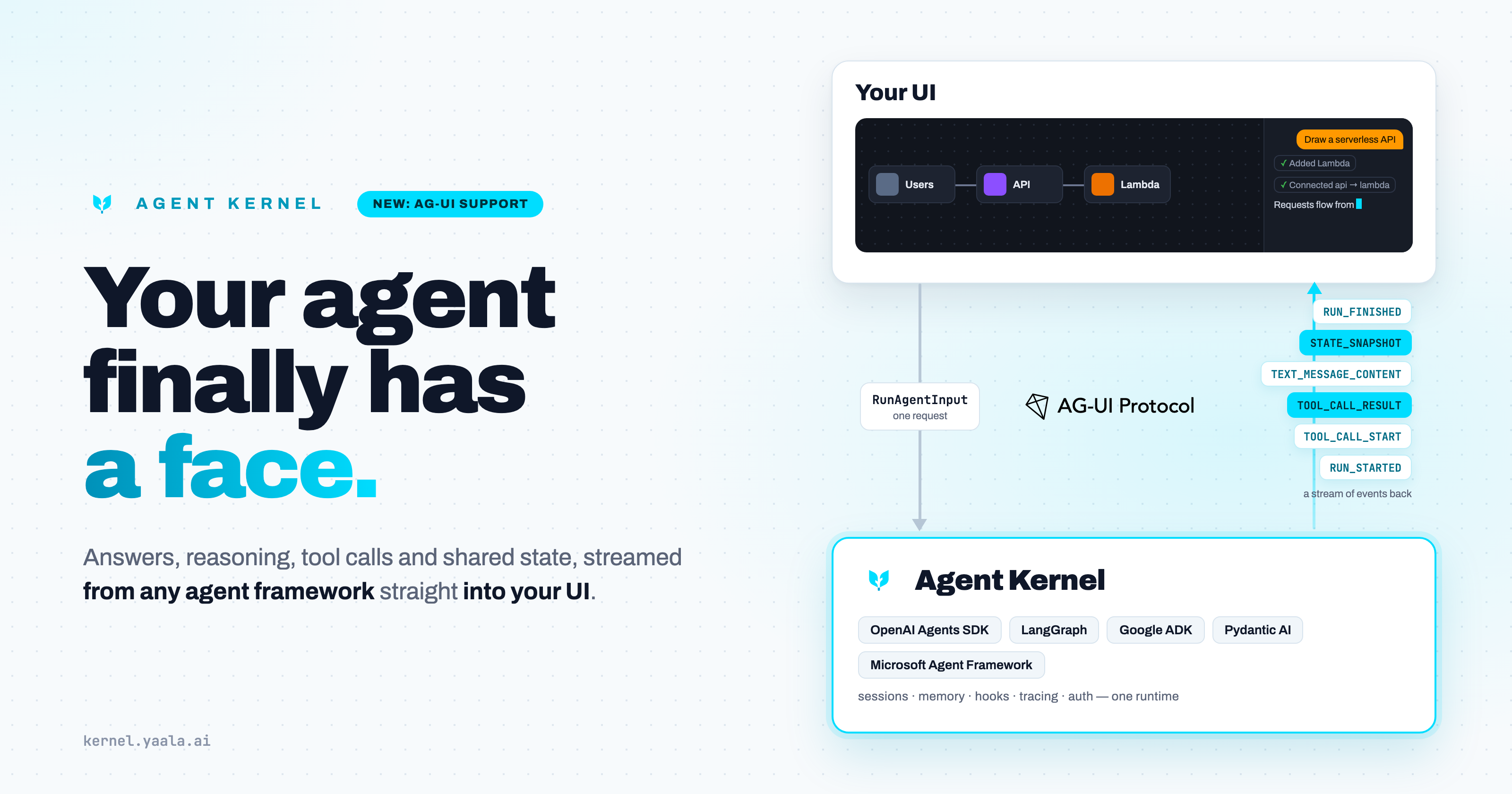
Most agents today are a black box with a text box in front of it.
You type a question. A spinner turns. Thirty seconds later a paragraph appears. Was the agent thinking? Calling a tool? Stuck? Waiting on a slow API? You have no idea, and neither do your users.
That is not a model problem. It is a plumbing problem. The agent knows exactly what it is doing at every moment. It just has no standard way to tell the screen.
Agent Kernel now speaks AG-UI, and your agent's work becomes something your users can see.
The Missing Layer Between Agents and People
The agent ecosystem has quietly standardised two of its three connections.
MCP connects agents to tools. A2A connects agents to other agents. Agent Kernel already supports both.
The third connection, agent to person, has been everyone's custom job. Every team writes its own streaming endpoint, its own event format, its own "is it still thinking?" logic, and its own frontend to match. None of it is reusable, and all of it breaks the day you swap frameworks.
AG-UI is the open protocol that fills that gap. It is a simple, event-based wire format: the frontend sends one request, and the agent streams back a sequence of typed events describing everything that happens during the run.
With AG-UI support, Agent Kernel now covers all three: tools, agents, and people. That is what we mean by full agentic UI support.
What Your Users Actually See
An AG-UI run doesn't return a reply. It streams the whole shape of the work:
- The answer, word by word as it is written.
- The agent's reasoning, as a separate "thinking" stream you can show dimmed, collapse, or hide, never mixed into the answer.
- Every tool call, with its name, its arguments as they arrive, and its result. Your UI can render each one as a card: "Looking up order ORD-1001… found it."
- What the agent is doing right now (thinking, calling a tool, replying, idle), read straight off the stream instead of guessed from a timer.
- Shared state: a JSON object that both the frontend and the agent read and write.
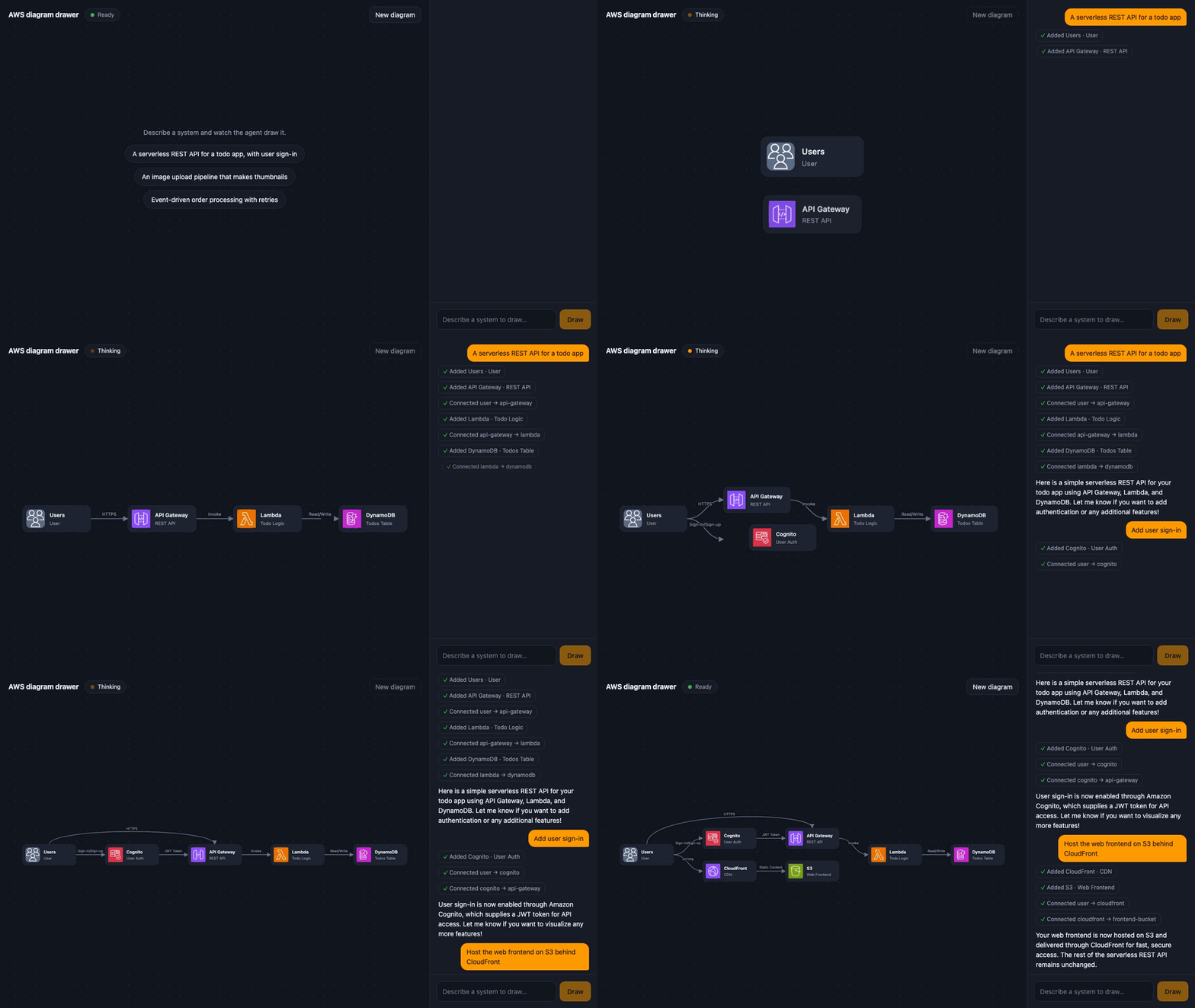
Here is what that looks like in practice: an agent that draws an AWS architecture as you describe it. Every box and arrow is a tool call, drawn on the canvas the moment its result streams in, while the reply writes itself into the chat beside it.
Shared State: The Agent Edits Your UI, Not Just Your Chat
Look at the diagram drawer above. The user says "a serverless REST API for a todo app."
In a chat-only world, the agent replies with a paragraph: "Use API Gateway in front of a Lambda that writes to DynamoDB." Nothing on screen changes. The user is left to draw the diagram themselves from a description.
With AG-UI, the diagram itself is the agent's to edit. Every box and arrow the agent adds lands on the canvas as its tool call finishes, and the whole diagram lives in shared state that Agent Kernel sends back to the browser when the run ends. So when the user follows up with "add user sign-in", the agent reads the diagram that is already there and slots Cognito into it, rather than starting over.
This is the difference between a chatbot bolted onto your app and an agent that actually works inside it. A form that fills itself in. A dashboard filter the agent sets. A cart the agent edits. A draft the agent and the user write together.
Built the Agent Kernel Way
AG-UI in Agent Kernel follows the same rules as everything else in the kernel.
Framework agnostic. Write your agent in the OpenAI Agents SDK, LangGraph, Google ADK, Pydantic AI or Microsoft Agent Framework. The frontend sees the same events either way. Change frameworks next quarter and your UI does not notice.
One handler, not a new server. AG-UI mounts alongside your chat API. Same sessions, same memory, same deployment.
Scales off the web tier. Runs go through Agent Kernel's queue pipeline. Put SQS, Kafka or NATS behind it, with Redis or Valkey for the replies and the sessions, and agent runs move to their own workers while the web tier just holds the connection and streams the events back. The frontend never knows the difference.
Secure by default. AG-UI has no anonymous mode. You plug in your own authoriser. Agent Kernel refuses to start the surface without one, because every run executes an agent on a real user's behalf.
Client context stays out of the prompt. The frontend can attach context to a run: the page the user is on, their local time, a selected record. Agent Kernel never pastes that into the system prompt. The agent has to ask for it through a read-only tool, so it reads that context as tool output, not as instructions.
Everything still applies. Sessions, memory, hooks, tracing, multimodal attachments: a run over AG-UI goes through the same runtime as any other request. Turn on multimodal support and users can even drop an image or a PDF into the conversation.
People stay in the loop. When an agent needs approval before it acts ("may I issue this refund?"), the run pauses cleanly and the frontend gets the question. The user clicks approve or deny, and the agent carries on from exactly where it stopped.
Get Started in Five Minutes
1. Install
pip install "agentkernel[openai,api,agui]"
export OPENAI_API_KEY=sk-...
2. Write the agent
# app.py
from agentkernel.agui import AGUIPipelineRequestHandler
from agentkernel.auth import Authoriser
from agentkernel.openai import OpenAIModule
from agentkernel.pipeline import IOHandler
from agents import Agent


class DemoAuth(Authoriser):
    def authorise(self, token):
        return "demo-user" if token == "demo-token" else None


agent = Agent(
    name="planner",
    instructions="You help the user keep a short task list. The list lives in the shared AG-UI "
    "state under the key 'tasks'. Whenever it changes, write the full new list back with "
    "update_agui_state.",
)
OpenAIModule([agent])

if __name__ == "__main__":
    IOHandler.run(handlers=[AGUIPipelineRequestHandler(authoriser=DemoAuth())])
Mounting AGUIPipelineRequestHandler is what turns AG-UI on. There is no flag to forget. The agent runs on Agent Kernel's queue pipeline: on your laptop that is still one process with nothing else to install, and pointing the config at a broker, with shared storage such as Redis for replies and sessions, moves the runs off the web tier without touching this code or your frontend. The AG-UI docs list every setting a broker needs.
3. Configure AG-UI
# config.yaml
agui:
  default_agent: planner
  state:
    enabled: true          # gives the agent get_agui_state / update_agui_state
  client_context:
    enabled: true          # lets the agent read what the frontend attaches
4. Run it and talk to it
python app.py
curl -N -X POST http://localhost:8000/agui \
  -H "Authorization: Bearer demo-token" \
  -H "Content-Type: application/json" \
  -d '{
        "threadId": "thread-1",
        "runId": "run-1",
        "state": {"tasks": []},
        "messages": [{"id": "m1", "role": "user", "content": "add milk and bread to my tasks"}],
        "tools": [],
        "context": [],
        "forwardedProps": null
      }'
Watch the events stream in: RUN_STARTED, a tool call to update_agui_state, the reply text arriving in pieces, a STATE_SNAPSHOT carrying the new task list, and finally RUN_FINISHED. That stream is everything your frontend needs.
5. Put a UI on it
The stream is plain Server-Sent Events, so any frontend can read it with fetch. The quickest start is our example: examples/api/agui is a small React + TypeScript app that renders every event kind: streamed answers, a thinking block, a card per tool call, a live status strip, a shared task-list panel and file attachments. Its code is written to be read, and easy to lift into your own app.
The Bottom Line
An agent nobody can see working is an agent nobody fully trusts.
AG-UI turns your agent's work into something people can watch, follow and steer: the answer as it forms, the reasoning behind it, every tool it touches, and the state it changes in your app. Agent Kernel gives you that with one handler, on the framework you already use, without giving up the security, sessions and observability you already have.
Your agent finally has a face.
Agent Kernel is open source under Apache 2.0.
- AG-UI protocol (official site): https://docs.ag-ui.com
- AG-UI in Agent Kernel: https://kernel.yaala.ai/docs/integrations/agui
- Runnable example with a React frontend:
examples/api/agui - Human-in-the-loop over AG-UI:
examples/api/hitl - GitHub: https://github.com/yaalalabs/agent-kernel